AI
Marketing
team structure

Most churn doesn't come from a single bad moment. It builds from small shifts in account context that accumulate quietly: a champion who left, a new leader who inherited your product without choosing it, usage that drifted, a renewal that crept up while everyone was focused elsewhere.
The problem is scale - a full book of business has too many accounts to monitor manually and by the time those shifts surface as a visible problem, the window to act has usually already closed. The AMs who consistently retain and expand aren't working harder than their colleagues, they've built a system that watches for context changes and tells them when to move.
These 4 signals are the most consistent pre-churn indicators I see across AM teams, and all 4 can be automated. Each one represents a moment where something in the account has changed in a way that puts the relationship at risk, before the customer knows there's a risk at all.
Here are the signals and plays every AM should have running.
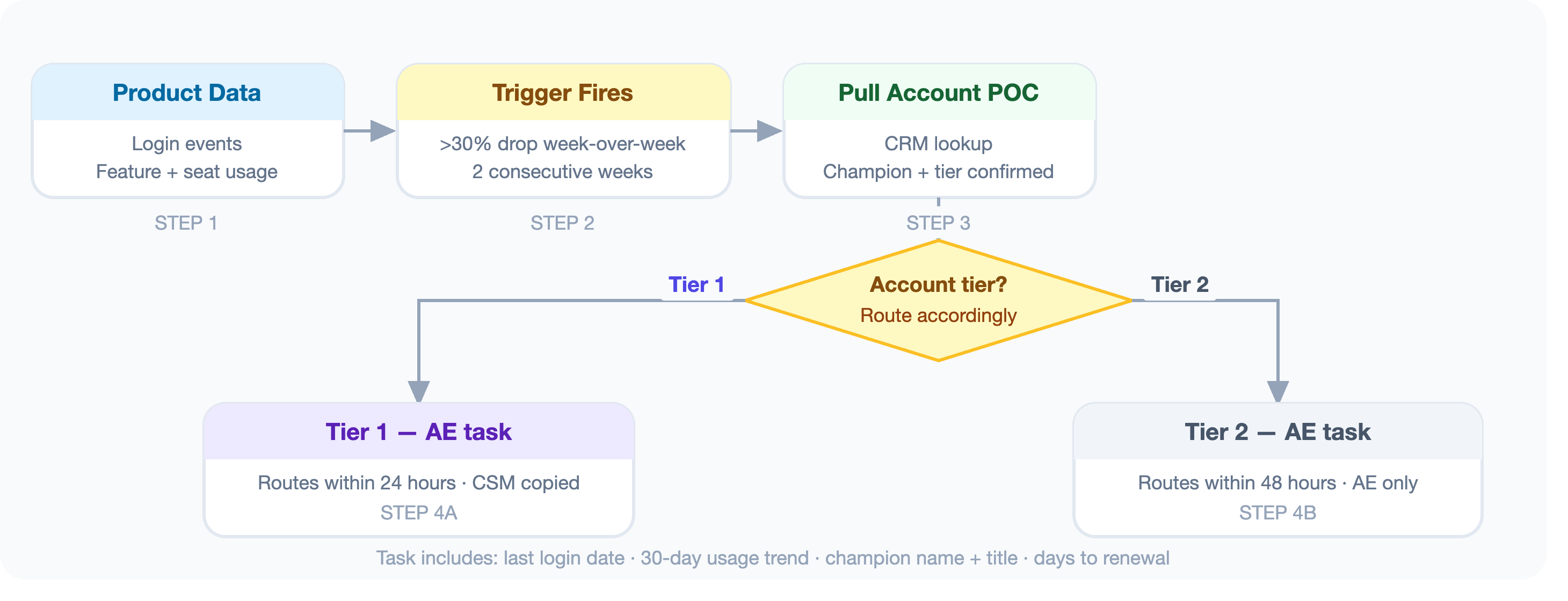
If your product has usage data, a drop in engagement is one of the most reliable early warnings for churn.
A customer logging in daily who drops to once a week didn't lose interest accidentally. Something happened, whether that's a champion who left, a competing priority that took over, or a product issue nobody escalated yet. The AM who reaches out now, before the renewal, before the QBR, and before the customer starts evaluating alternatives, still has a chance to fix it.
What the outreach looks like:
The task includes enough context that the AE can have an informed conversation without tipping their hand:
"Hey [Name], noticed we haven't connected in a bit and wanted to check in. How's the team getting on with [product]? Anything we can help with?"
The message reads as casual curiosity with no mention of what actually triggered the reach-out, which keeps the customer from getting defensive.
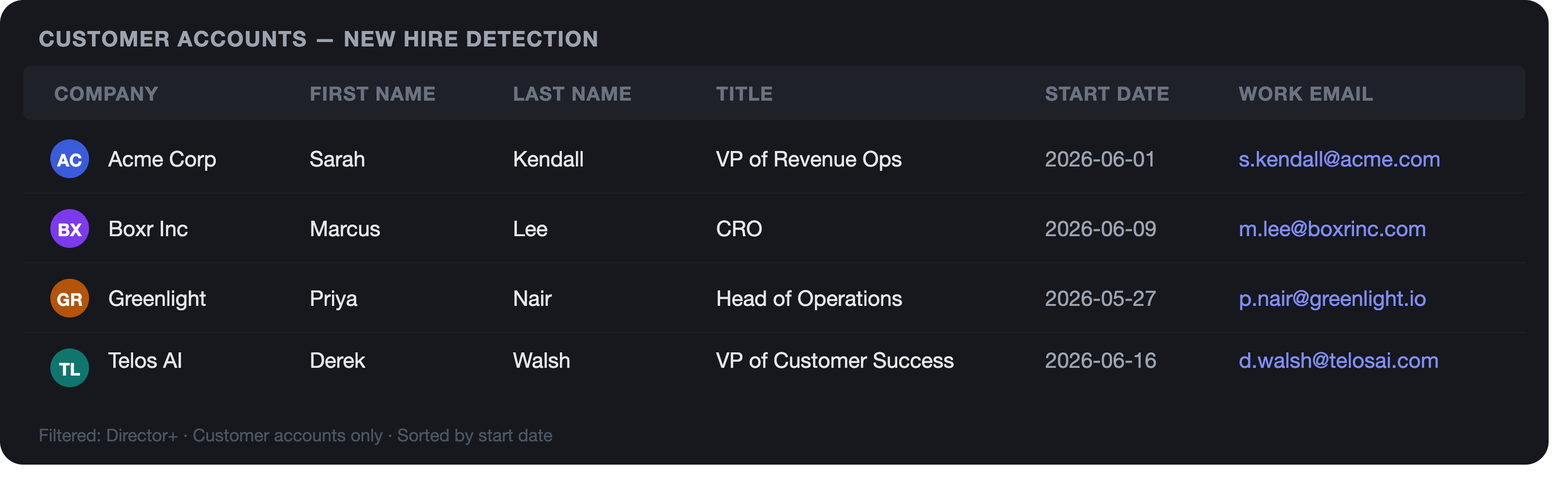
Trigger 2: New Leadership Hire at the AccountWhen a new VP joins the customer's team, a new CRO gets hired, or a new Head of Operations takes over the department that owns your product, it's both a risk and an opportunity.
The risk: new leaders often audit the existing tech stack and cut tools their team didn't choose or they haven't leveraged before. If they don't know you and the value your product provides, you're an easy line item to remove. The opportunity: if you reach out when they start to congratulate them, introduce yourself, and position yourself as a partner tied to their success in the new role, you become the vendor they choose to keep, regardless of inheritance.
What the outreach looks like:
Walking a new stakeholder through what their team has built with your product is an easy conversation to get on the calendar.
 Signal 3: Renewal Window Opens
A lot of us in Account Management get the timing wrong on this one. We reach out 30 days in advance of renewal, not knowing the customer has already been evaluating competitors for the past 2 - 3 months. At this point, the decision is likely already made, regardless of your email.
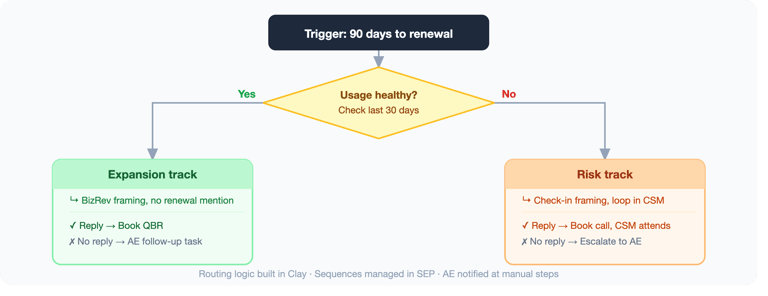
The right trigger is 90 to 120 days out. At that point the customer is still heads-down on getting value, likely hasn't started comparing vendors, and is open to a conversation about what's working and what's next.
What the outreach looks like:
Expansion track email:
"Hey [Name], your renewal is coming up in Q3 and I wanted to set up a quick call to walk through what the team has accomplished this year and what we're planning for next. Would 30 minutes work in the next 2 weeks?"
The risk track gets a lighter ask: check-in framing, CSM on copy.
Framing the conversation around value changes how the customer shows up to the call.
 Signal 4: Acquisition or Major Company Event
When a customer gets acquired, closes a round, announces a restructure, or opens a new office in a market you serve, most AMs find out about it weeks later (if at all), and by then the natural window to reach out has already closed.
Acquisitions are the highest-risk of the four. The acquiring company usually already has a preferred vendor in your category, and if you don't get in front of the new decision-makers before they run their stack audit, you often lose the account without ever getting a conversation.
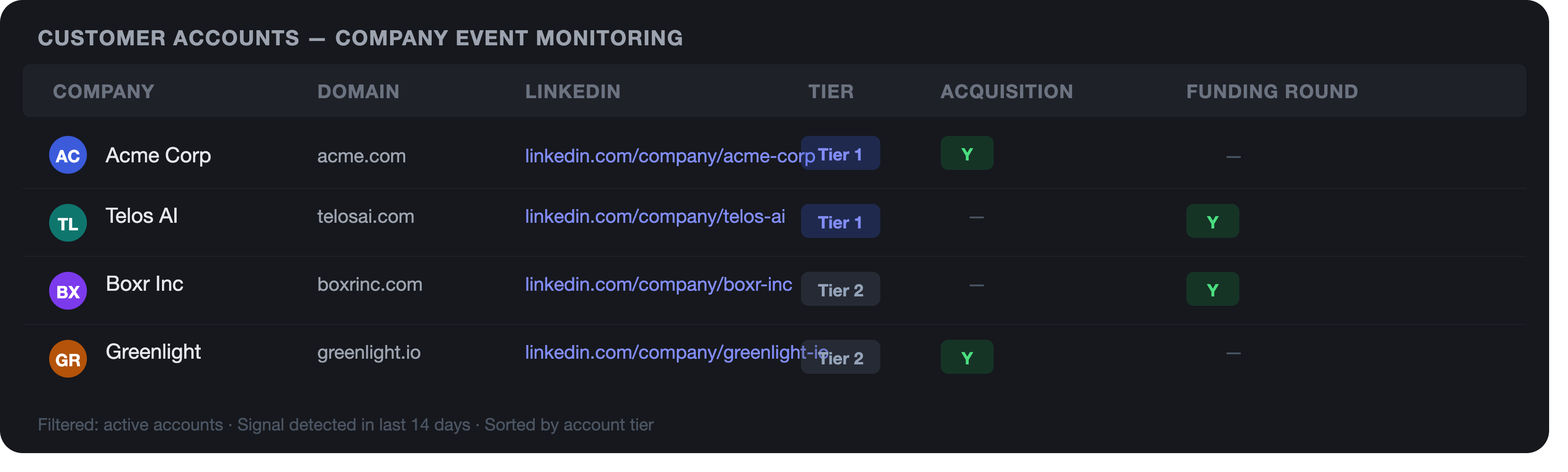 What the outreach looks like:
"Congrats on the [acquisition/funding/expansion]. Wanted to connect briefly to make sure our work together is set up to support what's coming next for your team."
Recent follow-up matters, especially on acquisitions, because the new team's vendor decisions happen fast and you want to be in that conversation before it starts without you.
These signals and plays are designed to fire before the problem becomes visible, which is the whole point. Once a customer files a support ticket, misses a QBR, or starts a competitive evaluation, the AM is already behind.
At Sales Tempo, we set these triggers up in Clay or your existing data stack, route them into your SEP, and build the sequences so your AMs get a task with context and a pre-drafted message; enough information to have a useful conversation without tipping their hand. The AM running this looks like they have a sixth sense about their accounts because the signals are actually that good.
If you want to build this for your team, zac@salestempo.io.